Day 08 of 90daysofdevops
Here, I am posting Day 08 from the #90DaysOfDevOps challenge,
#90daysofdevops
#Day08:
Basic Git & GitHub
1)What is Git?
Git is a version control System, that is used for Source Code Management. It is a free and Open-Source version control system, commonly used for the development of software to push and have the code at a centralized location. Where we can easily track the changes, enabling multiple developers to work together.
No alt text provided for this image
2)What is GitHub?
GitHub is a code hosting platform for Version Control and collaboration. It lets you and your teammates work together on projects from remote locations. We can perform commits, pull requests, push, create branches, and much more.
3)What is Version Control? How many types of version controls do we have?
Version Control basically, lets you track your changes to the code, if anything is messed up we can recall the previous version. Let’s suppose a team of developer add some new functionalities in an application and the updated version is not working properly so as the version control system keeps track of our work so with the help of the version control system we can omit the new changes and continue with the previous version.
Types of Version Control Systems:
Centralized Version Control Systems
Distributed Version Control Systems
Centralized Version Control Systems: Centralized version control systems contain just one repository globally and every user needs to commit for reflecting one’s changes in the repository. It is possible for others to see your changes by updating.
No alt text provided for this image
- Distributed Version Control Systems: In Distributed Version Control Systems, developers “clone” the repository in their local machine and start working on that local copy of the code present in the machine. At the end of the task, they need to create a “Pull Request” where someone will validate the code and push it into the Repository.
No alt text provided for this image
4)Why do we use distributed version control over centralized version control?
A distributed version control system (DVCS) brings a local copy of the complete repository to every team member’s computer, so they can commit, branch, and merge locally. The server doesn’t have to store a physical file for each branch — it just needs the differences between each commit.
i) better collaboration: In a DVCS, every developer has a full copy of the repository, including the entire history of all changes. This makes it easier for developers to work together, as they don’t have to constantly communicate with a central server to commit their changes or to see the changes made by others.
ii) Improved speed: Because developers have a local copy of the repository, they can commit their changes and perform other version control actions faster, as they don’t have to communicate with a central server.
iii) Greater flexibility: With a DVCS, developers can work offline and commit their changes later when they do have an internet connection. They can also choose to share their changes with only a subset of the team, rather than pushing all of their changes to a central server.
iv) Enhanced security: In a DVCS, the repository history is stored on multiple servers and computers, which makes it more resistant to data loss. If the central server in a CVCS goes down or the repository becomes corrupted, it can be difficult to recover the lost data.
Overall, the decentralized nature of a DVCS allows for greater collaboration, flexibility, and security, making it a popular choice for many teams.
Task:
- Install Git on your computer:
Visit the official website to download the git, https://git-scm.com/downloads
Here you can select your respective Operating System and download Git. 2) Create a free account on GitHub.
Ø Open, https://github.com
Ø Click on “Sign Up” and enter your details. Your account will be created.
- Create a new repository on GitHub and clone it to your local machine:
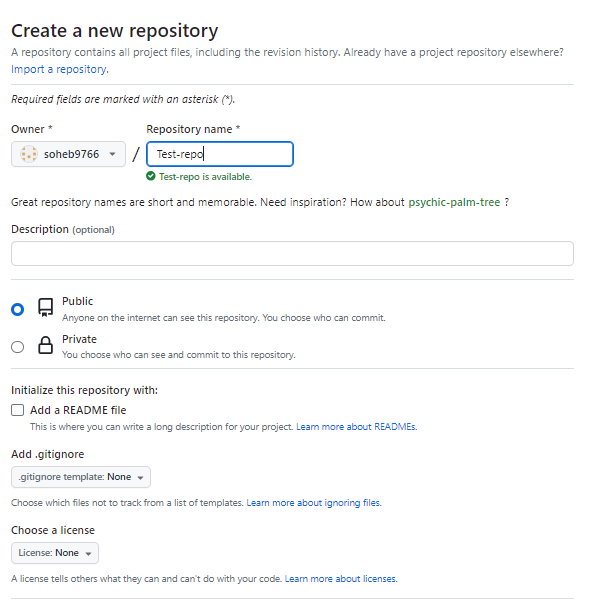
Ø To create a repository, there is a Plus option in the top right corner, inside that click on “New Repository”.
Ø Here, you can enter the details according to your requirement, and click on “Create Repository”.
Ø Now, in your local system, create an empty directory named “git”, inside the “git” directory, run the command “git clone <link_of_repository>”

4) Make some changes to a file in the repository and commit them to the repository using Git.
Ø Here, we will add a file named “test.txt”.
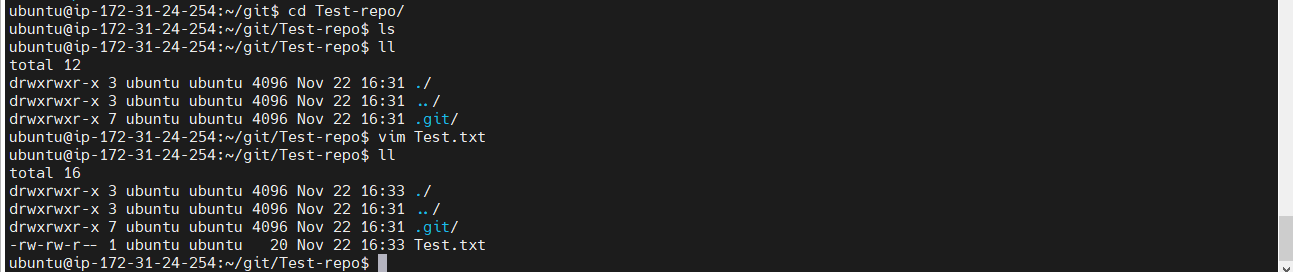
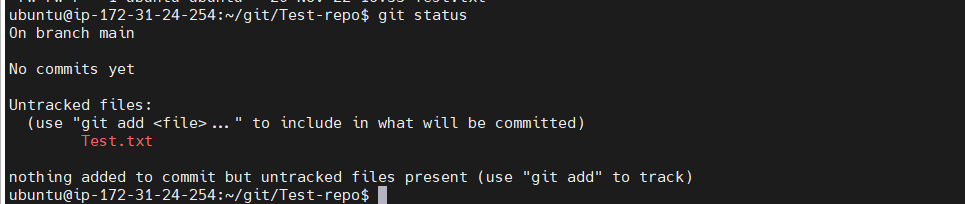
Ø Now, we will run the “git status” command to check, what is the status of files. And we can see that a new file is in untracked status that is in colour.
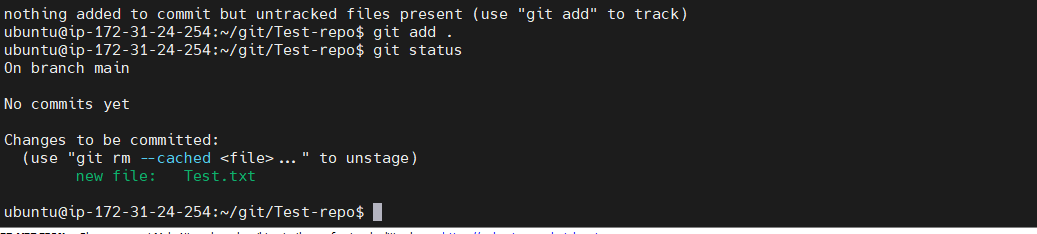
Ø We will run the “git add .” command to move the file into tracked one.
Ø Now, we will run “git commit -m “First Commit”” to make a commit.